Test Reporters
A reporter turns a run’s lifecycle events (run/suite/test/hook/assertion) into output. Tripwire
ships 14 built-in reporters — Mocha’s own built-in set, plus cargo — and you can register any
number of them for the same run.
Every sample below is real output from this suite, run against the same four tests: two passing,
one failing, one it.skipped, in two suites with one nested.
- Choosing a reporter
- Colours
- Selecting reporters
- Human-readable —
spec,list,min,dot - Progress animations —
progress,landing,nyan - Machine-readable —
tap,xunit,json,json-stream - Documentation output —
doc,markdown - Cross-ecosystem —
cargo - Reporter options
- In-place redraw on a real terminal
- Custom reporters — writing one, selecting one
Choosing a reporter
| Name | One-line summary | Best for |
|---|---|---|
spec (default) |
Indented suite/test tree with ✓/✗ | Reading a run as it happens |
list |
One flat, fully-titled line per test | Grepping output; copying a title into --grep |
min |
Summary and failures only | Watch mode, where the screen re-renders constantly |
dot |
One character per test | Very large suites |
progress |
Filling progress bar | Long runs where you want an ETA feel |
landing |
A plane landing | Fun |
nyan |
Nyan cat | Fun |
tap |
TAP version 13 | prove and TAP-consuming CI |
xunit |
JUnit/xUnit XML | Jenkins, Azure DevOps, GitLab test tabs |
json |
One JSON object at the end | Post-processing a whole run |
json-stream |
One JSON line per event | Streaming/incremental consumption |
doc |
HTML fragment | Embedding suite docs in a generated page |
markdown |
GitHub-flavored Markdown | Committing a suite overview to a repo |
cargo |
Rust cargo test style |
Teams working across Rust and TypeScript |
Colours
Every terminal sample below is an image, so the colours are the real ones wherever you are
reading this. They are not screenshots: docs/scripts/genReporterImages.js runs the built CLI once
per reporter, captures its actual ANSI output and translates it to SVG, so a sample cannot drift
from what the reporter prints. Re-run it after changing a reporter:
node docs/scripts/genReporterImages.js
(Images are used because neither Markdown code blocks nor inline HTML can carry colour — GitHub and
npm both strip style attributes when sanitizing rendered Markdown.) Each sample also carries a
written Colours line, which is what a screen reader and anyone viewing the alt text gets.
The palette is consistent across every reporter:
| Swatch | Colour | Used for |
|---|---|---|
| 🟢 | green | ✓, ., N passing, cargo’s ok and its Running/Finished/Testing verbs |
| 🔴 | red | ✗, !, N failing, the whole Failures: heading and each N) title, a failing test’s duration, cargo’s FAILED and error |
| 🟡 | yellow | -, ,, (skipped), N skipped, N pending, (slow) durations, cargo’s ignored |
| ⚪ | gray | passing durations, assertion messages, stack frames, the runway in landing, cargo’s note: |
| 🔵 | cyan | Running tests... (bold), progress’s bar fill, cargo’s bar fill |
| 🩵 | bright cyan | the run: trace prefix, landing’s plane |
| 🟣 | magenta | the hook: trace prefix; bright magenta for nyan’s cat |
| 🔵 | bright blue | cargo’s -->, | and = diagnostic gutters (bold) |
Bold is used on its own for structural emphasis: suite titles in spec, the Failures: heading,
cargo’s status verbs and its FAILED/ok verdict.
Machine-readable reporters emit no colour at all — tap, json, json-stream, xunit, doc
and markdown are meant to be parsed or committed, so an escape sequence in them would be a bug.
min adds no colour of its own; what you see comes from the shared summary and failure helpers.
Colour comes from @nevware21/chromacon, which disables
itself when the output is not a terminal — so a piped or redirected run, and every CI log, is clean
text with no escape sequences.
Selecting reporters
CLI — repeatable, or comma-separated, for several at once:
npx tripwire --reporter dot "test/**/*.test.ts"
npx tripwire --reporter spec,xunit "test/**/*.test.ts"
npx tripwire --reporter spec --reporter xunit "test/**/*.test.ts"
Config file:
// .tripwirerc
{ "reporters": ["dot"] }
Precedence. Unlike every other config-file setting (which CLI flags layer on top of), any
--reporter flag on the CLI replaces the config file’s list rather than adding to it —
otherwise there would be no way to select a single reporter once a config file already lists one.
With the config above, tripwire "test/**" runs dot; tripwire --reporter tap "test/**" runs
only tap.
Registering more than one works because every reporter is an independent IListener — the
notification manager fans each event out to as many listeners as are registered, so a
human-readable console reporter and a CI-consumable xunit file can both observe one run. The same
flag also takes a module path or package name for a reporter of your own — see
Custom reporters.
Human-readable
spec
The default. An indented suite/test tree, mirroring how the suites are declared, with durations and a failure block at the end.
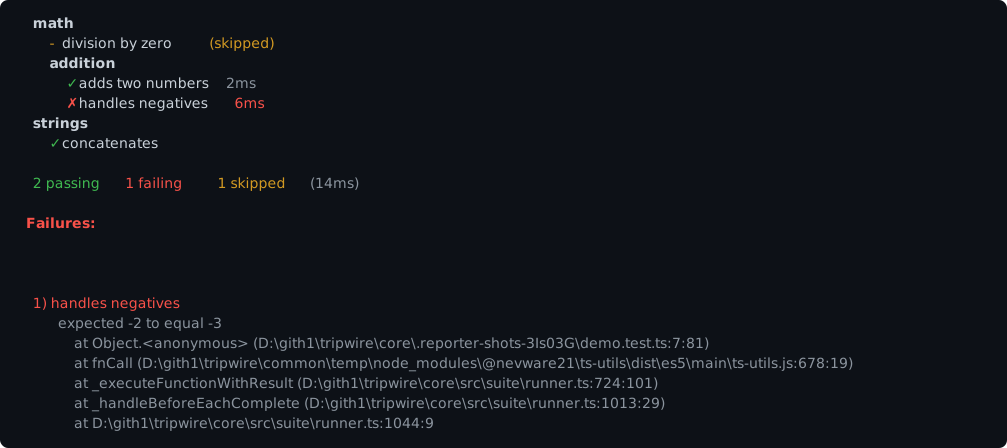
Colours: 🟢 ✓ · 🔴 ✗ and the whole Failures: block · 🟡 - and (skipped) · ⚪ passing
durations, the assertion message and stack frames · a failing test’s duration is 🔴 and a (slow)
one 🟡. Suite titles and Failures: are bold; the Running tests... header is bold 🔵.
A suite whose tests are all filtered out by --grep prints no header at all — titles are held
back and flushed only when something actually appears beneath them.
list
One line per test using its full Suite nested test title — flat rather than nested. The title
printed here is the same string --grep matches against, so a line can be copied straight into a
filter.
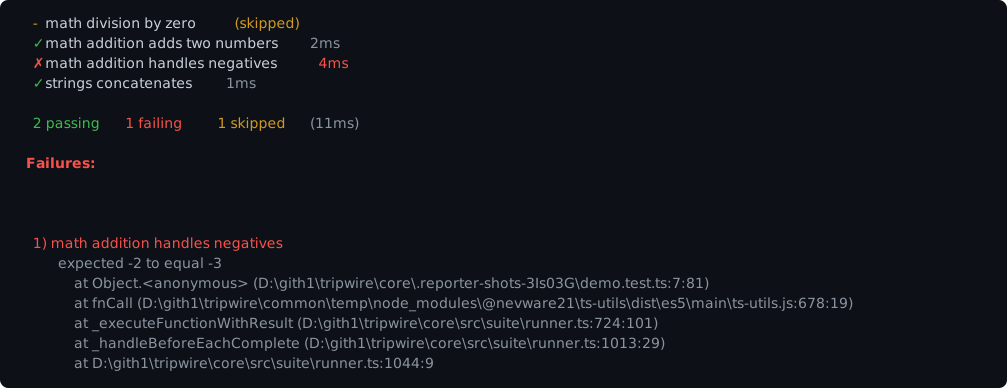
Colours: as spec — 🟢 ✓ · 🔴 ✗ · 🟡 - and (skipped) · ⚪ passing durations · 🔴 failing
durations.
min
Almost silent: no per-test output, only the summary and any failures. Good for --watch, where
the interesting part is what changed.
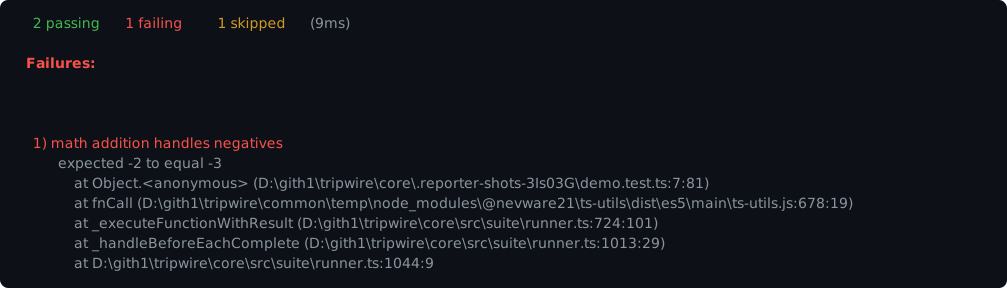
Colours: only the shared summary and failure block — 🟢 2 passing · 🔴 1 failing and the
Failures: heading · 🟡 1 skipped · ⚪ the message and stack.
dot
One character per test — . pass, ! fail, , skip — wrapping every 50 characters. Compact
enough that a few thousand tests stay on one screen.
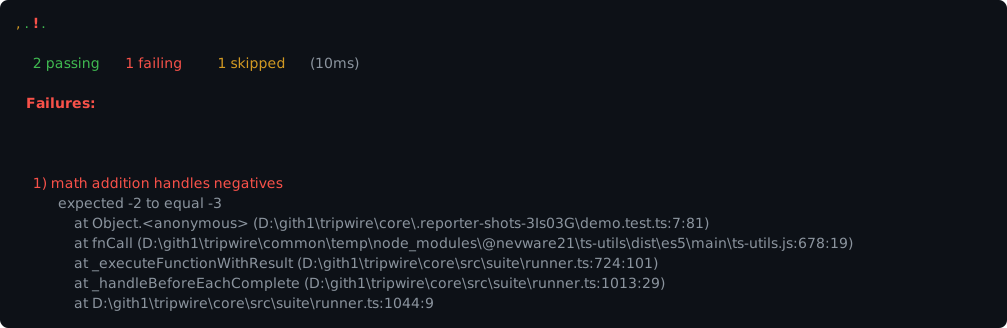
Colours: 🟢 . · 🔴 ! (bold) · 🟡 , — the row is a colour bar at a glance, which is most of
why this reporter is useful on a big suite.
Progress animations
All three redraw a single line in place on a real terminal, and fall back to one line per update when piped — see In-place redraw. The samples below show the piped (fallback) form.
progress
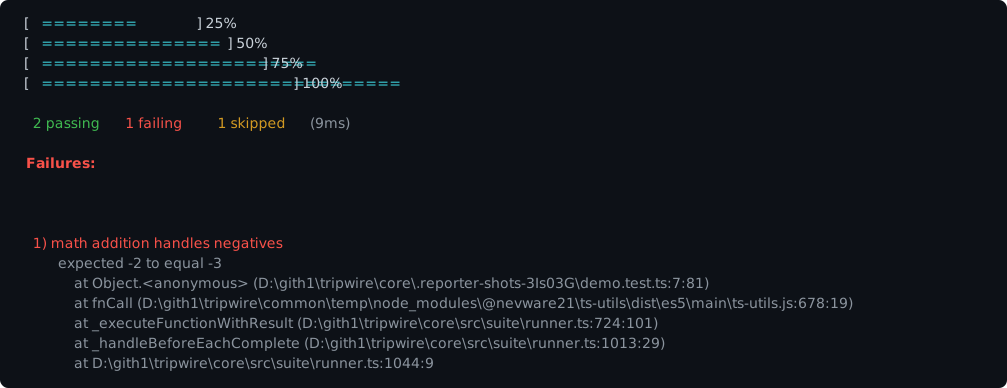
Colours: 🔵 the = fill; the brackets, percentage and summary are plain.
Reaches exactly 100% because every counted test emits a done event, including skipped and un-run ones.
landing
A plane flies along a runway and crashes on a failure.
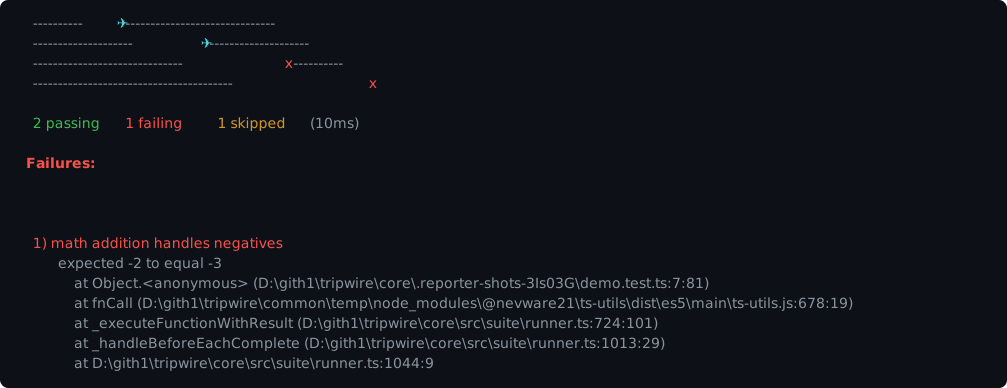
Colours: 🩵 the ✈ · 🔴 the x it becomes after a failure · ⚪ the runway.
nyan
A rainbow trail grows behind a cat.
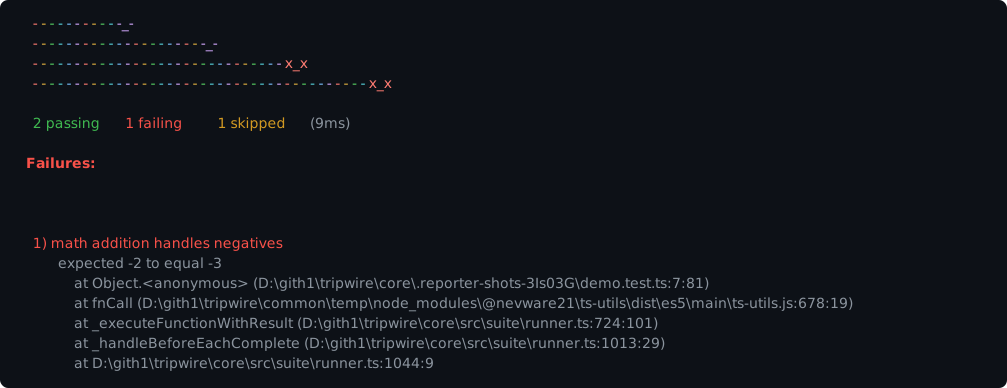
Colours: the trail cycles a six-colour rainbow; the cat is 🟣 bright magenta, turning bright 🔴
as x_x once something has failed.
Machine-readable
tap
TAP version 13. The plan line is emitted before any test runs and
always matches the number of result lines that follow — including tests that never ran, which
appear as # SKIP rather than going missing.
TAP version 13
1..4
ok 1 - math division by zero # SKIP
ok 2 - math addition adds two numbers
not ok 3 - math addition handles negatives
  ---
  message: "expected -2 to equal -3"
  ...
ok 4 - strings concatenates
# tests 4
# pass 2
# fail 1
# and \ in a test description are escaped, since TAP reads a bare # as the start of a
directive.
xunit
A single JUnit/xUnit-compatible <testsuite> document — the format most CI systems natively
understand. Suite paths become classname, so the CI test tab groups them.
<?xml version="1.0" encoding="UTF-8"?>
<testsuite name="Tripwire Tests" tests="4" failures="1" skipped="1" timestamp="..." time="0.012">
  <testcase classname="math" name="division by zero" time="0.000">
    <skipped/>
  </testcase>
  <testcase classname="math addition" name="adds two numbers" time="0.002"/>
  <testcase classname="math addition" name="handles negatives" time="0.006">
    <failure message="expected -2 to equal -3"><![CDATA[AssertionFailure: expected -2 to equal -3
    at Object.<anonymous> (test/demo.test.ts:7:81)]]></failure>
  </testcase>
  <testcase classname="strings" name="concatenates" time="0.000"/>
</testsuite>
The five XML entities are escaped, ]]> inside CDATA is split safely, and C0 control characters
(an ANSI escape in an assertion message, say) are stripped — they are invalid in XML 1.0 even as a
numeric reference, and would otherwise produce a document Jenkins rejects.
Redirect it to a file with your shell: npx tripwire --reporter xunit ... > results.xml.
json
A single object emitted once the run completes, with stats plus the full test list.
{
  "stats": {
    "tests": 4, "passes": 2, "failures": 1, "pending": 1,
    "start": 1786810113206, "end": 1786810113216, "duration": 11
  },
  "tests": [
    { "title": "division by zero", "fullTitle": "math division by zero", "status": "skipped", "duration": 0 },
    { "title": "adds two numbers", "fullTitle": "math addition adds two numbers", "status": "passed", "duration": 3 },
    {
      "title": "handles negatives",
      "fullTitle": "math addition handles negatives",
      "status": "failed",
      "duration": 4,
      "err": { "message": "expected -2 to equal -3", "stack": "AssertionFailure: ..." }
    },
    { "title": "concatenates", "fullTitle": "strings concatenates", "status": "passed", "duration": 0 }
  ]
}
passes/failures/pending partition the run exhaustively, and pending merges skipped and
pending — mocha’s JSON shape has one field for both.
json-stream
One ["event", data] line per event as it happens, for a consumer that wants results incrementally
rather than at the end.
["start",{"total":4}]
["pass",{"title":"division by zero","fullTitle":"math division by zero","status":"skipped","duration":0}]
["pass",{"title":"adds two numbers","fullTitle":"math addition adds two numbers","status":"passed","duration":3}]
["fail",{"title":"handles negatives","fullTitle":"math addition handles negatives","status":"failed","duration":4,"err":"expected -2 to equal -3"}]
["pass",{"title":"concatenates","fullTitle":"strings concatenates","status":"passed","duration":0}]
["end",{"tests":4,"passes":2,"failures":1,"pending":1,"duration":10}]
Every line is independently parseable. Note that the event name is only ever pass or fail
(matching mocha’s stream shape) — a skipped test arrives as pass and is distinguished by its
status field, so consumers should read status rather than the event name when the difference
matters.
Documentation output
Both of these render each test’s source, so they describe what a suite covers rather than how a run went.
doc
A nested HTML fragment — <section> plus <h1>–<h6> per suite, <dl> per test — for embedding
into a generated page. Classes (suite, test passed/failed/skipped) are there to style
against.
<section class="suite">
  <h1>math</h1>
  <dl class="test skipped">
    <dt>division by zero</dt>
    <dd><pre><code>function () { assert.equal(1, 1); }</code></pre></dd>
  </dl>
  <section class="suite">
    <h2>addition</h2>
    <dl class="test passed">
      <dt>adds two numbers</dt>
      <dd><pre><code>function () { assert.equal(2 + 2, 4); }</code></pre></dd>
    </dl>
  </section>
</section>
markdown
A GitHub-flavored Markdown document: a table of contents, a heading per suite, and each test’s source in a fenced block.
# TOC

- [math](#math)
  - [addition](#addition)
- [strings](#strings)

# math

 - - division by zero

```js
function () { assert.equal(1, 1); }
```
Test bodies are shown as transpiled, not as authored — a .ts test appears as its emitted
JavaScript.
Cross-ecosystem
cargo
Renders a run in the visual language of Rust’s cargo test — useful if you work across both
ecosystems and would rather not switch reading habits.
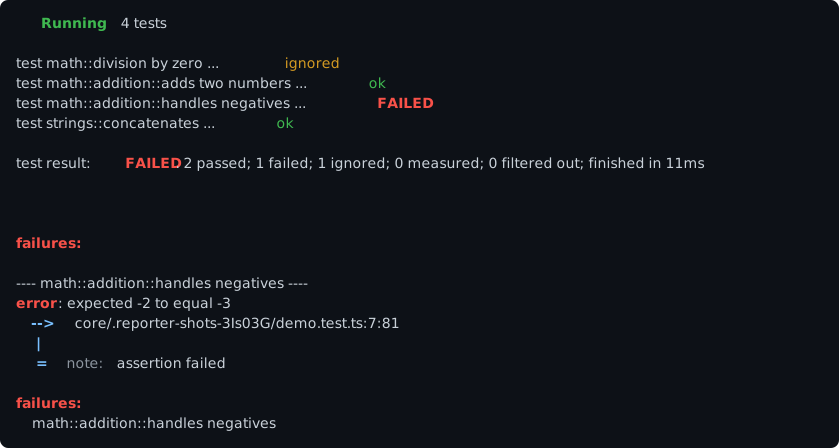
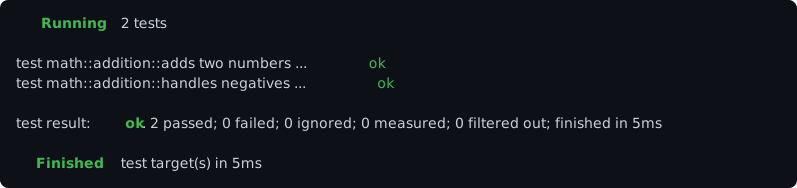
Colours: 🟢 the Running/Testing/Finished verbs and ok (bold verbs) · 🔴 FAILED, error
and both failures: headings (bold) · 🟡 ignored · 🔵 the bright-blue -->, | and = gutters
(bold) · ⚪ the note: label.
A clean run closes with cargo’s Finished verb instead; a failing one stops at the verdict, as
cargo does:
Progress bar
On a real terminal, cargo keeps a live status line beneath the scrolling log. This reporter does
the same, in cargo’s Building-style shape — right-aligned verb, bar with a > head,
completed/total, and the test currently finishing:

Those are four successive redraws of one line, not four lines: the bar is blanked before each
permanent test ... ok line is written and redrawn underneath it, so results scroll normally while
the status line stays pinned at the bottom. The > head becomes a solid = at completion.
Colours: 🟢 the bold Testing verb · 🔵 the =/> fill · the brackets, counter and test name
are plain.
Like cargo, the bar disappears entirely when output is not a terminal — a \r-redrawn line is
meaningless in a log file, and the permanent test ... ok lines already carry every result. It is
also absent on the browser and worker targets, which bridge output back through a plain
log/error sink. Turn it off explicitly with showProgress: false, or resize it with
progressWidth.
Where the two runners do not line up exactly:
| cargo | tripwire |
|---|---|
module::path::test name |
Suite titles joined with ::. Descriptions are kept verbatim (spaces included) rather than snake_cased, so the name still matches what --grep accepts and what every other reporter prints. |
ignored |
Skipped and pending tests. Rust has one concept (#[ignore]) for “declared but not run”, and one summary field for it. |
measured |
Always 0 — that field counts #[bench] results, and tripwire has no benchmark concept. |
filtered out |
Always 0 — a --grep-excluded test is not part of a tripwire run at all (neither counted nor reported), so nothing remains to describe as filtered by the time a reporter sees the totals. |
Both zeroes are honest for this runner rather than unimplemented; they are kept because the line is the recognisable part of the format.
Reporter options
The CLI exposes the two options every reporter accepts uniformly — --slow → slowThreshold,
--trace → showExecution. The rest are internal defaults tuned per reporter, reachable only by
constructing a reporter programmatically.
| Reporter | Option | Default | Notes |
|---|---|---|---|
spec |
showSuiteTitles |
true |
Print each suite’s title as it starts. |
spec |
showHooks |
false |
Print hook (before/after) events. |
dot |
width |
50 |
Characters per row before wrapping. |
json |
indent |
2 |
JSON indentation; 0 for a single unindented line. |
min |
clearScreen |
(none) | Optional hook invoked once at run start (eg. to wire an ANSI screen-clear on a Node CLI). Core never touches the terminal directly, to stay usable in browser/worker. |
progress |
width |
30 |
Bar width in characters. |
landing |
width |
40 |
Runway length in characters. |
nyan |
width |
40 |
Rainbow trail length in characters. |
xunit |
suiteName |
"Tripwire Tests" |
name attribute on the emitted <testsuite>. |
cargo |
showLocations |
true |
Show the --> file:line:col line under a failure. |
cargo |
showProgress |
true |
Draw the in-place Testing [===> ] n/total bar. Only ever appears when console.write is supplied. |
cargo |
progressWidth |
30 |
Bar width in characters, between the brackets. |
Every reporter also accepts console, a sink of the shape { log, error, write? }, which is how
the browser and worker targets bridge output back to the CLI.
In-place redraw on a real terminal
progress, landing, nyan and cargo redraw a single line in place (via \r) rather than
logging a fresh line per update — but only when given a raw write sink (options.console.write).
The CLI supplies this automatically when stdout is an actual TTY; piped output (redirected to a
file, | tee, CI logs) has no such sink, since raw \r/cursor sequences would just read as garbled
text there.
The three animation reporters and cargo differ in what they do without it:
Piped / no write |
|
|---|---|
progress, landing, nyan |
Fall back to logging each update as its own line — that animation is their output, so dropping it would leave nothing but the summary. |
cargo |
Draws no bar at all. Its per-test test ... ok lines already carry every result, so the bar is pure decoration and cargo itself drops it off a TTY too. |
Custom reporters
A reporter is just an IListener — onStart, onDone and onAssert, all optional — so writing
one is straightforward. --reporter (and the config file’s reporters array) selects one by
module, the same way --ux-provider selects a UX module.
Writing one
The module must export one of three shapes — a listener, a { listener } object (what every
built-in factory returns), or a createReporter(options) factory returning either. Everything a
TypeScript reporter needs comes from the published @nevware21/tripwire package:
// reporters/mine.ts
import { IListener, eListenerEvent } from "@nevware21/tripwire";

const listener: IListener = {
    onDone: (event, context) => {
        if (event === eListenerEvent.Test) {
            const ctx = context.v;          // the context is lazy -- `.v` builds it

            console.log(ctx.test.description + ": " + ctx.end.status);
        }
    }
};

export default listener;
event is a number — the same value on every target, including over the browser/worker wire — so
a plain-JavaScript reporter compares against the literals directly: 0 run, 1 suite, 2
test, 3 hook, 4 assertion. (eListenerEvent is a const enum, inlined at compile time,
so it is available to TypeScript only.)
The factory form receives the same options object the built-ins get — slowThreshold,
showExecution, and a console sink (log/error, plus write when stdout is a TTY). Prefer
writing through that sink rather than console.log directly, so the reporter behaves the way the
built-ins do when output is piped:
// reporters/mine.js
module.exports = {
    createReporter: (options) => {
        const out = (options && options.console) || console;
        let tests = 0;

        return {
            listener: {
                onDone: (event) => {
                    if (event === 2) {          // eListenerEvent.Test
                        tests++;
                    } else if (event === 0) {   // eListenerEvent.Run
                        out.log(tests + " test(s)");
                    }
                }
            }
        };
    }
};
A module that exports none of onStart, onDone or onAssert fails the run with a message
saying so, rather than being registered as a reporter that silently prints nothing.
Test Execution Flow describes the events and what each context carries; the built-in reporters are the worked examples.
Selecting one
| Value | Means |
|---|---|
./reporters/mine.js, ../shared/mine, C:\proj\mine.js |
A path, resolved from the working directory |
@me/tripwire-reporter, some-pkg/reporter |
A scoped package, or a package subpath |
module:my-reporter |
A bare package name — the prefix is required here (see below) |
spec, tap, … |
A built-in name from the table above |
npx tripwire --reporter ./reporters/mine.js "test/**/*.test.ts"
npx tripwire --reporter spec,./reporters/mine.js "test/**/*.test.ts"   # alongside a built-in
npx tripwire --reporter module:my-reporter "test/**/*.test.ts"
// .tripwirerc
{ "reporters": ["spec", "./reporters/mine.js"] }
A value carrying a /, \, . or a leading @ cannot be a built-in name, so it is taken as a
module. A bare word can’t be told apart from a mistyped built-in, so it is still validated
against the names above — --reporter spce reports a typo rather than failing to resolve a
package. module: is the explicit escape hatch for genuinely wanting a bare package name.
Node target only
Custom reporter modules apply to --target node. The browser and worker targets build their
reporters inside the page/worker from the names in the run payload, where a node module cannot
be loaded — selecting one there fails the run with a message saying so, instead of quietly falling
back to spec. Use a built-in name for those targets.
Programmatically
Against a runner you construct yourself, a reporter is just a listener to add — no module resolution involved:
import { createTestRunner, getRootSuite } from "@nevware21/tripwire";

const runner = createTestRunner(getRootSuite());
runner.addListener({
    onDone: (event, context) => { /* ... */ }
});
Related
- Test Runner, CLI & Configuration — every flag and config field
- Test Execution Flow — the events reporters observe
- Runner Troubleshooting — known issues and their fixes